Accounts, presets and limits
The Users and Presets tabs
Administrators see two more tabs. Nobody else sees either. The Loggers tab, for administrators and users, has a page of its own.
The Presets tab
A preset is a broker and what to watch on it: its gateways, the meters to expect and the AES keys. It is chosen by name on the Session tab. The list was called Brokers until 2026-09-23, when it had stopped being a list of brokers.
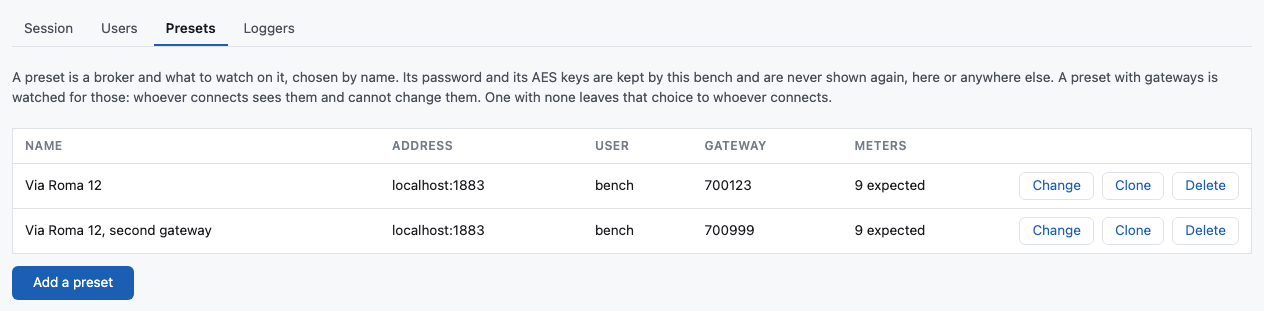
A preset is chosen by name. The bench holds the broker's address, its account and its password, and the page is never told any of them — not even an administrator's page. A password already on record shows as kept.
Add a preset opens a window with the fields. Only two of them must be filled.
| Field | What to write |
|---|---|
| Name | What the list shows. Usually the building. Needed. |
| Address | The broker's host name. Needed. |
| Port | Optional. Empty means 8883 with TLS and 1883 without, and the field shows which. |
| TLS | Ticked by default. |
| User, Password | The broker's own account. Optional, for a broker that wants none. |
| Topic prefix | Optional. Empty means nrg/qgw6direct, the Qundis default, and the field shows it. The list has no column for it: a preset on another prefix says it after its address. |
| Gateway | Optional. The gateways this broker is watched for. Several, separated by commas or semicolons, is allowed. A session on this broker watches these and no others; with none here, whoever connects chooses. |
| Meters to expect | Optional. The serial numbers that building has, separated by spaces, commas, semicolons or lines. A session on this broker expects these and cannot change them. |
| AES-128 keys | Optional. The keys of the meters that gateway hears, one to a line. |
The gateway and the keys save typing, and they work differently. The gateway is not a secret: choosing this broker writes it into the Gateway field on the Session tab, where you can see it, change it, or clear it to hear every gateway on that broker. The keys are secret — the page is never told them — so the bench adds them to the session itself, and the Session tab says only how many are kept. Keys you type there are used as well as these, not instead.
Change opens the same window, filled. The password field is empty and says kept unless you type one: leave it, and the password on record stays. The keys are the same — the box is empty and the label says how many are kept — and Remove the keys is how you have none. Clone opens the same window as a new broker, filled from that row, with the name ready to be typed over. The password and the keys come with it, although the page is never told either: the bench copies them. Type a password to use another one. This is the quick way to list one server once per gateway: clone the row, change the name and the Gateway field, and save.
Delete removes the row. A session already running on that broker goes on running.
A name is used once. One broker may be listed twice under two names, for two buildings with different prefixes or different accounts, or for two gateways on one server. The list on the Session tab names the gateways each entry keeps, after its address, so two entries for one server can be told apart.
The Users tab
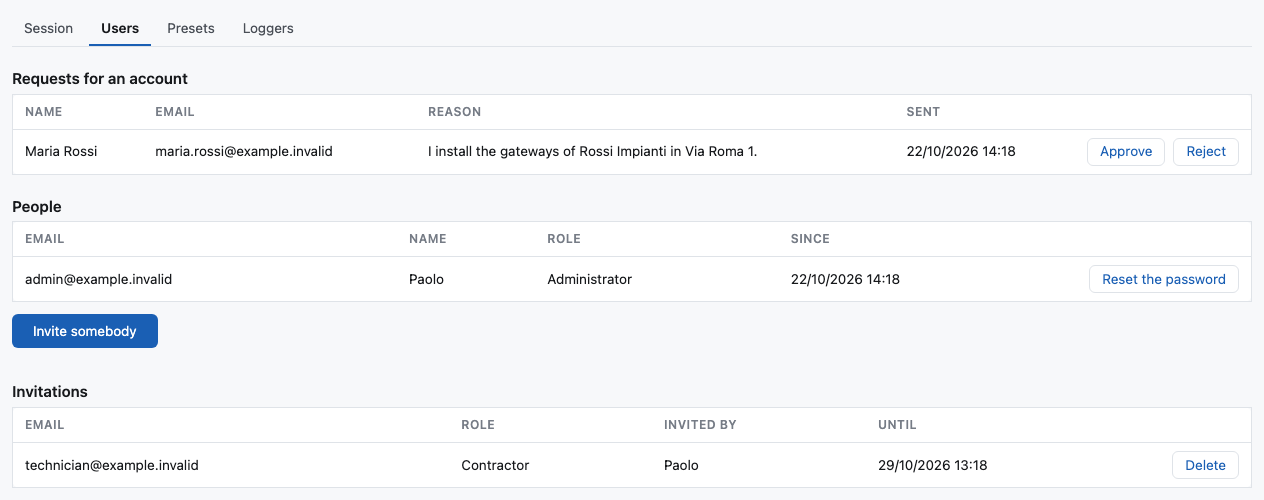
Invite somebody opens a window. Give an email address and a role, and press Write an invitation.

The window stays open, holding the link, and that is on purpose: the bench keeps only a hash of it, so the link exists once and nowhere else. Copy it before you press Close — nothing can show it again. Send it to the person yourself: the bench does not mail an invitation you write here. An invitation lasts seven days and works once, and can be deleted before it is used.
The People table lists the accounts. Disable stops an account signing in and leaves its row and its assignments where they are; Enable gives it back. An administrator cannot disable their own account.
Requests for an account
Somebody with no account can ask for one with Ask for an account, beside Sign in. They give a name, an email and a reason. Every administrator is sent an email, with a link to this tab. The request waits at the top of the tab, under Requests for an account.
- Approve asks for a role, and Contractor is the default. It writes an ordinary invitation for that email and role, and sends the person its link by email. Where the bench cannot send email, the window shows the link instead: copy it and give it to them, as for an invitation you write.
- Reject asks first, by name. The person is sent nothing. The email on a request was typed by whoever asked, and may be somebody else's.
A request for an email that already has an account, or that already waits, is not kept. The person is told the same thing either way, so the form does not say who has an account here. One address can send three requests in an hour, and at most twenty requests wait at once. A request is deleted after 30 days, answered or not.
To give a contractor gateways before they accept, use the invitation that the approval wrote, as for any other invitation.
When somebody cannot sign in
Reset the password on their row writes them a new way in. The bench sends no mail, so this is the only one: there is no forgot my password a person can press for themselves.

Copy the link and give it to them. They open it, choose their own password, and are signed in by the same step. You never learn their password, and it is theirs from the first use.
- It works once, and for seven days.
- Writing it interrupts nobody. They may still be working, and a link on its own changes nothing.
- Using it signs out every browser that account had. A password is changed because the old way in is not trusted, so a page still open somewhere is exactly what the change is for.
- A second link makes the first stop working, so one written by mistake can be replaced.
- A disabled account cannot be let back in by a link written before it was disabled.
An administrator can do this for their own account too. Disabling yourself is refused, because it could lock the bench; choosing yourself a new password cannot.
What a contractor was given
A contractor's row has a Gateways button. It opens a window with what they have now, one line each: the broker, the gateways, and the meters, with (key) after a meter the bench holds a key for. Remove at the end of a line takes that one away, and asks first.
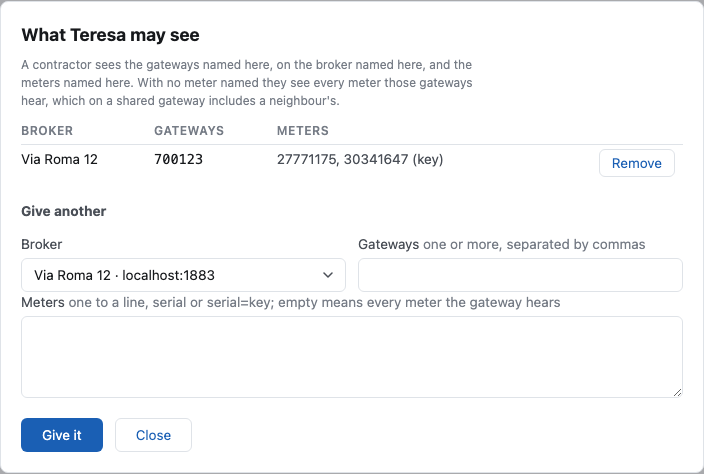
Under it, Give another:
| Field | What to write |
|---|---|
| Broker | One of the listed presets, by name. |
| Gateways | One gateway, or several separated by commas or semicolons. The box starts with the gateways that broker keeps, which you can change. |
| Meters | Optional. One to a line, as serial or serial=key, where the key is the meter's AES-128 key. |
Name no meter at all, and the assignment is every meter those gateways hear — including the neighbours' meters, which a gateway hears too. Name the meters when that matters.
A contractor given several gateways may watch them all in one session, or name some of them. A gateway they were not given is refused, exactly as a broker they were not given is.
Give a contractor nothing, and they can open no session at all.
A key is never shown again. An administrator who typed one sees only that there is one.
Limits
| Sessions on the bench at once | 24 |
| Sessions from one address | 4 |
| Waiting for a broker to answer | 10 seconds |
| A session nobody reads | ends after 15 minutes |
| Any session | ends after 12 hours |
| Telegrams held after a session ends | 4 hours, or 7 days for a session an administrator opened |
| A readout booked from the page | 5 to 60 minutes |
| Gateways named in one session | 50 |
| Meters to expect in one session | 2,000 |
| Lines in Gateway raw data | the last 200 |
| Messages kept for one gateway | the newest 5,000 |
| Telegrams kept by a session | the newest 10,000 |
| Loggers, running or not | 20 |
| People watching one session by link | 10 |
| Requests for an account from one address | 3 an hour |
| Requests for an account waiting at once | 20 |
What the bench can send to a gateway: a readout's start and stop, a list of meters, a restart, a new measurement of its signal, its schedule, and — for an administrator only — the four actions above.
Why the sign-in is optional
For somebody who brings a broker's own password, the broker checks who they are: without it they connect to nothing. A password on the bench as well would be a second secret, and would say nothing about who may use which broker. So the page still opens for anybody, and that is the shortest way to look at a gateway you already hold the credentials for.
An account answers a different question — which broker may this person use, and which gateway — and that is a question the broker cannot answer. A contractor is the case it was added for: somebody from outside, in one building for one afternoon, who should not be given the building's MQTT password at all.
What is logged is the connection: that a session opened, from which address, to which broker, and, when somebody was signed in, who they are. Every change an administrator makes is logged with the address it came from.
A broker's password typed into the form is used to hold the connection and is gone when it closes; keys typed into the form are gone with the session. A broker's password and a contractor's keys on record are sealed in the database, so a copy of a backup carries neither.