Asking a gateway
Asking for a readout
A gateway hears meters only during a readout. The system that collects a building's readings books one on the building's schedule. You can book one by hand here:
-
Choose how long under Readout: 5, 15, 30 or 60 minutes. 30 is the default.
-
Press Ask for a readout, in the Readout panel or on the gateway's card.
When you name several gateways, the Readout panel's buttons ask all of them: one press books a readout on every gateway of the session, and one press of Stop the readout stops them all. Each card still asks its own gateway, with the duration chosen in the panel. While one of them is reading, the panel's Ask for a readout is not available — a second readout on a gateway that is already reading would replace the one the bench can still stop — and the panel says how many are reading, as 2 of 3 gateways have a readout under way. Use that gateway's own card for one of them.
When you watch every gateway on the broker, the Readout panel has no buttons: that is whatever the broker carries rather than a list you chose. Each card has its own button and uses the duration chosen in the panel.
Beside these two is Schedule connection, which sets the schedule of every gateway of the session — see Changing a gateway's schedule.
You can ask for a readout whatever the gateway last said. The bench sends it only to a gateway that is connected. A gateway is connected for about a minute a day, so most of the time it is not listening; the bench keeps the readout and sends it when the gateway connects. The page says The readout was asked for. A gateway that is connected receives it now. A gateway that is not connected receives it when it connects. That wait is normal, and it can be long.
A gateway that has said nothing since you connected may be connected or not.
The bench asks it to measure its signal, which you see in the log as
dl/network/update, and sends the readout when the gateway answers.
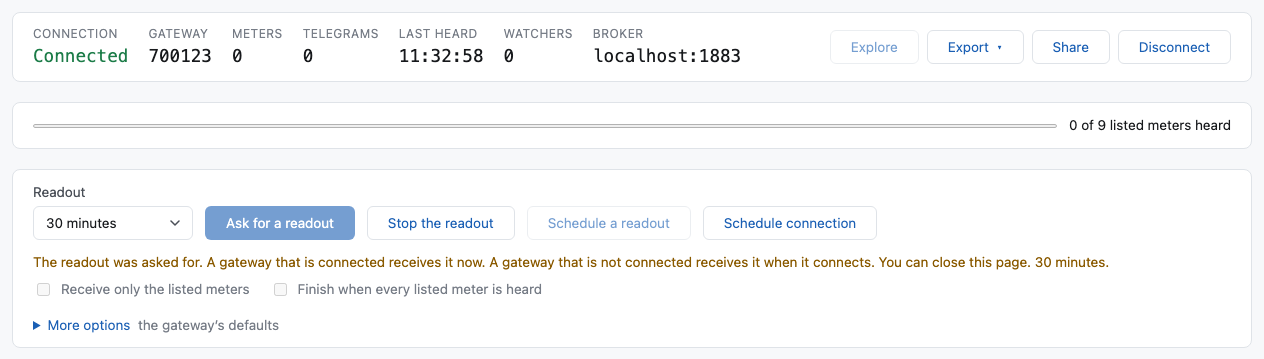
Then the page follows the readout: The readout was asked for, then The readout is running, and at the end The readout finished or The gateway cancelled the readout.
Stop the readout ends it early. If the readout is still waiting for its list of meters, nothing is sent at all. A stop sent before the readout has started can reach the gateway too early, and be ignored; if that readout then starts, the bench sends the stop again. If it is running, the bench sends a stop for its own readout only. A readout somebody else booked — the collecting system's, or another person's — is shown in the log and is never stopped from here.
A readout at a chosen time
Schedule a readout, beside Stop the readout, asks for a readout that starts at a date and a time you choose. The button in the Readout panel asks every gateway of the session, and the button on a card asks that gateway.
-
Choose the duration and the options in the Readout panel, as for a readout that starts now.
-
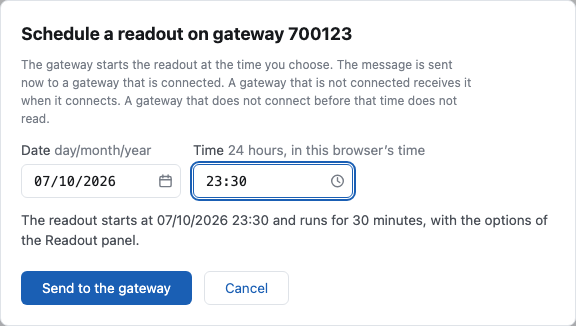
Press Schedule a readout, and choose the date and the time. The button in each box opens a calendar or a list of hours and minutes. You can also type them: the date is day/month/year, like
06/10/2026, and the time is on a 24-hour clock, like23:30. The list has every fifth minute, and any other minute is typed. The time is in your browser's time. -
Press Send to the gateway.
The message is sent at once to a gateway that is connected, and when it connects to a gateway that is not. The gateway keeps the time and starts the readout by itself. It says nothing until then, so the bench sends the same message again every time the gateway connects, until the readout starts or the time passes. You can close the page: the session stays, and you find it again under Coming back to a session.
The card says Scheduled, and Starts at with the date and the time. When the readout starts, the page follows it like any other.
Three things to know:
- The gateway must connect before that time. A gateway that connects once a day, at 23:00, cannot start a readout at 15:00 that you ask for at 14:00. If the time passes and the gateway has not started, the card says Not started.
- The time must be at least 5 minutes from now, and in the next 29 hours. The bench does not keep a readout for longer.
- Stop the readout before the time does not remove it from the gateway. A gateway ignores a stop while no readout runs. The bench sends the stop again when the readout starts, so keep the session: do not press Disconnect before that time.
Using the list of meters to expect
When you listed meters, two more choices appear under the buttons:
- Receive only the listed meters. The bench sends the list to the gateway first, and the gateway then sends only those meters. It still hears the others; it does not send them. The readout starts when the gateway says it holds the list, and the card says Waiting until then. If the gateway refuses the list, no readout is sent, the card says List refused, and the gateway's error is on its card.
- Finish when every listed meter is heard. Only with the first. The gateway ends the readout as soon as each listed meter has sent a telegram, instead of at the end of its time.
These need a gateway with firmware 2.4 or later.
More options
More options opens the rest of what a readout can be asked for. Most of the time the gateway's own choices are right; the line beside More options says how many you changed.
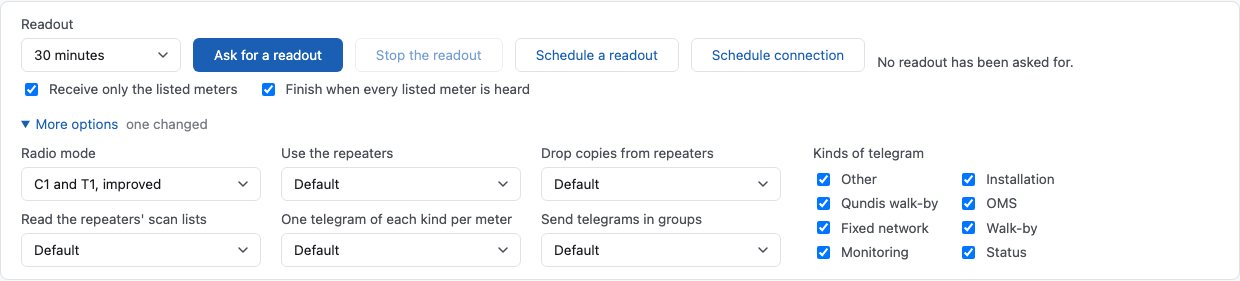
| Option | What it does | Normally |
|---|---|---|
| Radio mode | Which wireless M-Bus modes the gateway listens in. C1 and T1, improved needs firmware 2.2 or later; an older gateway does not know it. | C1 and T1 |
| Use the repeaters | The repeaters assigned to the gateway repeat for the whole readout. | Default (on) |
| Drop copies from repeaters | A telegram a repeater sends again is dropped when the gateway had it already. | Default (on) |
| Read the repeaters' scan lists | After the readout, each repeater says which meters it hears and how well. They appear on the card and in the Signal section. | Default (off) |
| One telegram of each kind per meter | Enough to know a meter is there, and much less data. | Default (off) |
| Send telegrams in groups | The gateway keeps telegrams for up to five minutes and sends them together, which saves battery. They arrive late. | Default (on) |
| Kinds of telegram | Which kinds the gateway sends. | all |
Five of these options have three choices: Default, On and Off. With Default the bench does not name the option to the gateway, and the gateway does what it normally does; the table says what that is. With On or Off the bench names the option. Leave Default unless you need the other: a gateway with older firmware can refuse a readout that names an option it does not know. Without the repeaters, the two options about them cannot be chosen.
With Default, the gateway sends telegrams in groups. They arrive up to five minutes late. Set Send telegrams in groups to Off to receive each telegram at once.
While a readout is waiting or running, these choices cannot be changed. They show what that readout was asked for. When it ends, they are yours again.
This browser keeps the options you chose, including the readout time, and offers them the next time you open the bench. They are kept in the browser, so another person, or the same person on another computer, gets the normal ones. To go back to the normal ones, set each option back by hand.
Restarting a gateway
Restart, in the Device part of a card, restarts the gateway's firmware. Its settings are kept. The page asks you to confirm, and names the gateway.
- While the gateway is Online, it is sent at once.
- While the gateway is not connected, the bench keeps the restart and sends it when the gateway connects. The card says The restart waits for the gateway to connect, and the button becomes Cancel the restart. You can close the page: the session stays in the Sessions panel.
- The restart is never forced. The gateway first finishes what it is doing, such as a readout, and then restarts.
- When the gateway connects again after the restart, the card says The gateway restarted at …. The gateway then sends its device details, and they appear in the Device part.
A restart is written to the bench's own log with the address it came from, like a readout.
Changing a gateway's schedule
Schedule connection, under the parts of a card, opens a dialog for that gateway. It is available whether or not the gateway is connected.
The gateway needs firmware 2.4 or later. An older firmware does not have this command, and the command can make an older gateway fail. So the bench looks at what the gateway has said:
- Its firmware is 2.4 or later, or it has sent its schedule: the bench sends.
- Its firmware is older: the button is disabled, and nobody can send.
- It has said neither: the bench asks you first, and names the gateway. A gateway says its firmware after a restart, and the bench keeps it, so restart the gateway once if you are not sure.
The same button in the Readout panel changes every gateway of the session at once, and is there whenever you named one or more gateways at Connect. A building has two or three gateways and one schedule, so this is one dialog instead of three. The dialog names the gateways that receive it, and its button says Send to the gateways. A gateway with a firmware that is too old is left out, and the dialog names it too. Each card still changes its own gateway. Where you watch every gateway on the broker there is no such button: that is many buildings rather than one.
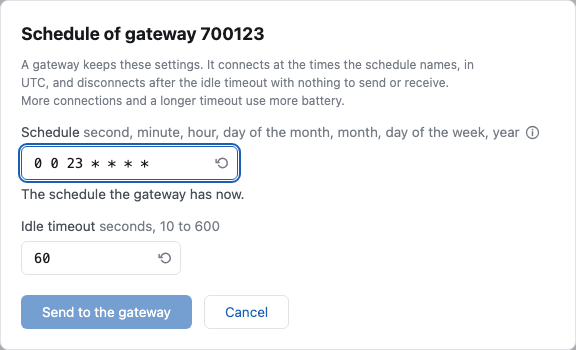
- Schedule is when the gateway connects on its own, as seven fields in
UTC: second, minute, hour, day of the month, month, day of the week (0 is
Sunday) and year. Write the year in full, as
2027, or counted from 2000, as27. The day of the month and the day of the week must both match. - Each field takes
*for any value, a number, a range like7-15, a list like9,11,15, or a step like*/30. A range may be written with a step,21-31/2. For example0 0 23 * * * *is every day at 23:00 UTC,0 30 6,18 * * 1-5 *is 06:30 and 18:30 on weekdays,0 */30 * * * * *is every half hour, and0 30 16 1 6 2 2027is one connection, on Tuesday 1 June 2027 at 16:30 UTC. - The (i) after the name of the field shows a short reference of this syntax, with examples. Move the pointer over it, or click it to keep it open. Escape closes it.
- This is not the cron of a logger. A logger has a Quartz
schedule, which counts the days of the week from 1 and wants a
?. - As you type, the dialog shows the next three connections in your browser's time, or why the schedule cannot be sent.
- Idle timeout is how long the gateway stays connected with nothing to send or receive, from 10 to 600 seconds.
- The turning arrow inside each box, on the right, writes the usual value: every day at 23:00 UTC, and 60 seconds. Move the pointer over it to read which value it writes.
The fields start with what the gateway last said it has. If it has not said since you connected, they are empty. Send to the gateway sends only what you changed. The card then says Waiting for the gateway to confirm until the gateway reports its new settings.
For several gateways, a field is filled only where they all say the same thing. Where one has not said, or where two say different things, the field is empty: there is no value that is true of all of them. What you type is sent to every one of them, including a gateway that has it already.
A gateway that is not connected receives it when it connects. The bench keeps the message and sends it at the gateway's next connection, and the card says so. This is how a schedule is changed on these gateways at all: they are connected for about a minute a day. If you send several changes before the gateway connects, it receives only the last one.
The bench refuses a schedule with connections less than 10 minutes apart, and an idle timeout of 0 (never disconnect). Each connection and each second connected uses battery. Every change is written to the bench's own log with the address it came from.
A readout costs data. The gateway sends everything it hears over a metered SIM, for the whole readout. That is why the bench stops its readout by itself when your session ends: when you press Disconnect, or when nobody is reading the session any more — you closed the tab, or the network went.
What is queued for a gateway
A gateway is connected for about a minute a day, so most of what you ask waits. Queued actions lists what the bench still has to get to a gateway, one row for each: a readout, a connection schedule, an idle timeout, a firmware update or a restart. Each row has the gateway, what was asked, and when.
State says where the action is:
- Waiting for the gateway: the gateway is not connected, so the action is not sent yet. The bench sends it when the gateway connects.
- Sent, not confirmed: the bench sent it while the gateway was connected. It sends it again at each connection, until the gateway shows that it has it.
- Waiting for the list: a readout whose list of meters was sent first. The start is sent when the gateway says it has the list.
The row goes when the gateway has the action.

The bin at the end of a row removes the action. An action that was not sent is removed, and the gateway never receives it. A readout that was sent is stopped, as Stop the readout does. A schedule or an idle timeout that was sent is not sent again, but the gateway may have it already. Only an administrator has the bin of a firmware update, and a watch link has no bin.
A stop can wait too. If you stop a readout while its gateway is not connected, the stop is a row, Stop of a readout, until the gateway connects and receives it. This row has no bin: the card already says the readout is stopped.
An administrator's actions
Four buttons on a card change the gateway itself, so only a signed-in administrator sees them, and the bench refuses anybody else. Each is available only while the gateway is Online, asks you to confirm, and names the gateway. The firmware update is different in two ways: it can be asked for while the gateway is not connected, and its window is the only question. Each is written in Gateway raw data as it was sent, the card says when it was sent, and the bench's own log records who sent it.
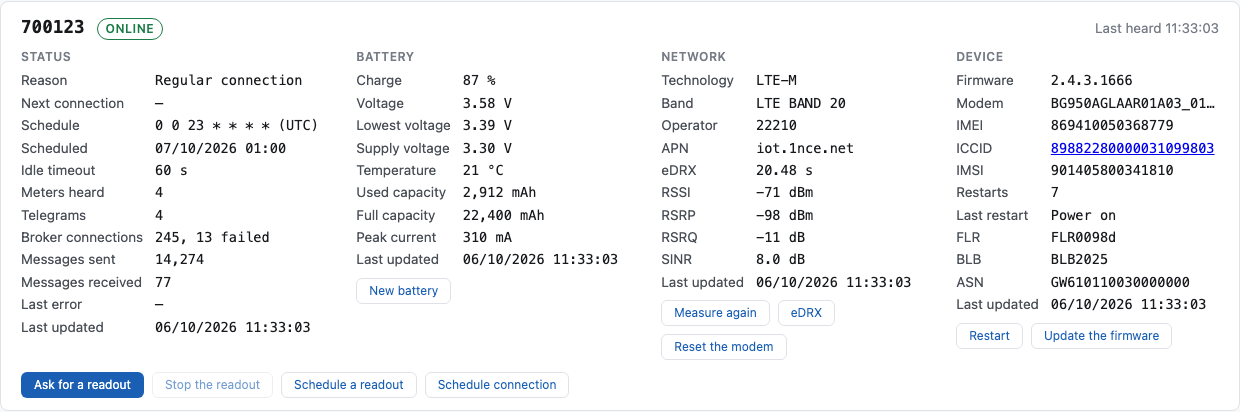
| Button | Where | What it does |
|---|---|---|
| Update the firmware | Device | The gateway downloads a firmware image and installs it when any readout has finished, then restarts and sends its new version. |
| eDRX | Network | Turns the modem's eDRX on or off, and chooses its interval. |
| Reset the modem | Network | Resets the modem to its factory settings, once, before the next connection. The broker, the APN and the other settings are kept. |
| New battery | Battery | After a new battery is fitted: the gateway counts what it uses from nought again, against the capacity you give. |
Update the firmware sends an image the bench keeps, or one at an address you give.
The same button is in the Readout panel, beside Schedule connection, when the session names its gateways. There it sends one image to every gateway of the session. A gateway that is connected is sent it now; a gateway that is not is sent it when it connects, for up to 30 hours. A session that watches every gateway of a broker does not have this button.
- An image on the bench. Image lists the images the bench keeps, each by its version and its description, the highest version first. Choose one and send it. The bench serves it itself, over plain HTTP, which a gateway can always reach. Plain HTTP is safe for this: the image is encrypted and signed, so nobody can read it or change it on the way. Delete this image removes the one that is chosen.
- New image. The image comes from Qundis as a
.gblfile. Choose New image in the list: a window opens. Choose the file, type its version (four numbers, like2.4.3.1666) in Version, and press Upload. You can also give it a few words in Description, which the list then shows. The window closes and the new image is the one chosen. The bench keeps it until somebody deletes it; one upload serves every gateway. - At an address I give. For an image on a server of your own: the version, the server's name, the port, the path, the size in bytes, and whether it uses TLS. That server must answer without a sign-in, and over TLS it must use an ECDSA certificate.
For an image on the bench, the card says how far the gateway has got with the download: Image downloaded: 71,865 of 143,730 bytes. Allow an older version is needed to go back to an earlier firmware. A bad image is refused, and the gateway keeps the version it has; the reason is in Last error, and its tooltip gives the HTTP status and the bytes received.
eDRX lets the modem sleep between checks of the network while the connection stays open. A longer interval saves battery, and the gateway cannot be reached while it sleeps. Where you are not sure what the network supports, do not choose more than 20.48 s.
New battery asks for the new battery's capacity in mAh, from its label.