Loggers
A logger reads gateways on a schedule, with no page open. It keeps every telegram and every value it reads, and it delivers them as files by email, by FTP or by SFTP. It starts again by itself when the bench restarts.
A user or an administrator has the Loggers tab. A contractor does not.
Who has a logger
An administrator makes a logger, and then gives it to users: Details, then Users, and a tick for each user.
A user who was given a logger sees it, changes it, starts and stops it, and reads what it kept. A user cannot change:
- its name and its preset;
- its gateways, when an administrator wrote them. When the administrator left the gateways empty, the user writes them.
Only an administrator deletes a logger: Change, then Delete.
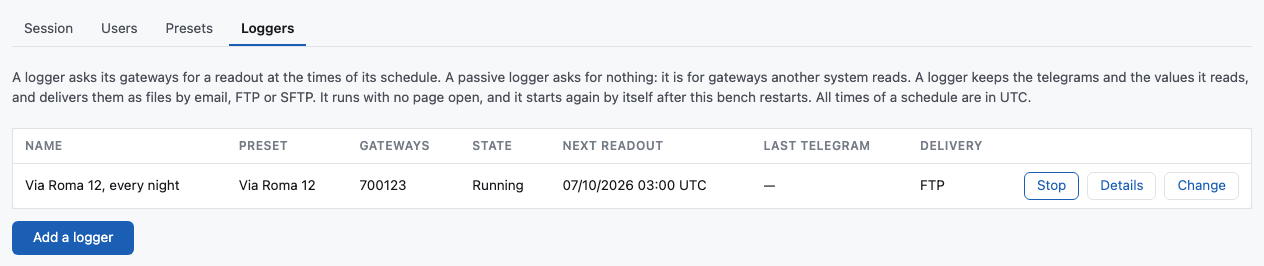
What a logger holds
Add a logger opens a window with the fields.
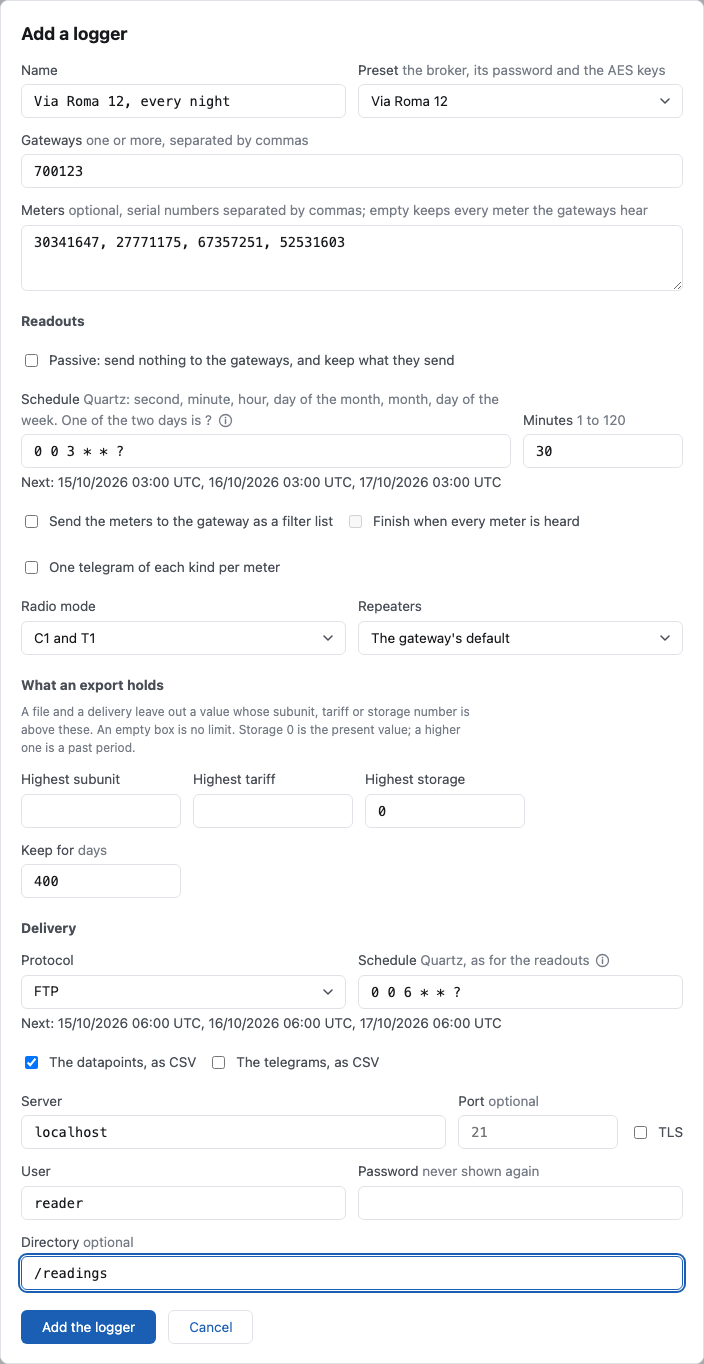
| Preset | The broker, its password and the AES keys. |
| Gateways | One or more gateway ids. A logger with none does not start, unless it is passive: a passive logger with none keeps every gateway of the broker. |
| Meters | Optional. With a list, the logger keeps only these meters. With none, it keeps every meter the gateways hear, the neighbours' too. |
| Passive | The logger sends nothing to the gateways. See below. |
| Schedule | When a readout starts, as a Quartz cron in UTC: second, minute, hour, day of the month, month, day of the week. One of the two days is ?. 0 0 3 * * ? is every day at 03:00, 0 0 3 L * ? the last day of each month, 0 0 3 LW * ? its last working day, 0 0 3 L-3 * ? three days before the last, and 0 0 3 ? * FRI#1 the first Friday. A day of the week is a name or a number from 1, Sunday, to 7. This is not the cron of a gateway's own schedule. The whole syntax is in How a schedule is written. |
| Minutes | How long a readout runs, 1 to 120. |
| Options | The filter list, one telegram of each kind, the radio mode and the repeaters, as in the Readout panel of a session. |
| Highest subunit, tariff, storage | What a file holds. A value above one of these is left out. An empty box is no limit. Storage 0 is the present value. |
| Keep for | How many days the logger keeps what it read. |
| Delivery | Email, FTP or SFTP, its own schedule, which is a Quartz cron too, and what is sent: the datapoints, the telegrams, or both. |
The page shows the next three times under each schedule.
The (i) after the name of each schedule shows a short reference of the Quartz syntax, with examples. Move the pointer over it, or click it to keep it open. Escape closes it and leaves the window open. The whole syntax, with more examples, is in How a schedule is written.
When the preset names gateways or meters, the window writes them into Gateways and Meters for you. Choose another preset and they change with it. What you typed yourself stays.
How the readouts run
A gateway sleeps most of the time, and it keeps one readout for later. So the logger asks each gateway for the next readout only, with its start time. The bench sends the request again each time the gateway connects, until the readout starts. When a readout ends, the logger asks for the next one.
Two things follow:
- One logger reads a gateway. A second logger on the same gateway would replace the readout of the first, so the bench refuses to start it.
- A readout you ask for by hand in the logger's session replaces the one the logger asked for. The logger asks again when yours ends.
Stop stops a readout that runs now. A readout the gateway already holds for later still runs once, and nothing is kept from it.
A passive logger
Tick Passive for gateways that another system reads. A passive logger sends nothing to a gateway: no readout, no stop, no schedule. It keeps what the gateways send when that other system reads them.
A passive logger may name no gateway. It then keeps what every gateway under the preset's topic prefix sends. On a broker with many gateways that is a lot of telegrams: give it a list of meters, or a short Keep for, when you do not need all of them.
A passive logger shares a gateway with anything. Its session refuses every button that would send something.
What is kept
- Every telegram, as it arrived, with the time and the gateway.
- Datapoints: one value of one meter. A meter sends the same value many times in a readout, so a datapoint is kept when the value changed, or when the last one kept is an hour old.
A telegram that cannot be read, because the preset has no key for it, is kept as a telegram and gives no datapoint.
Changing a logger
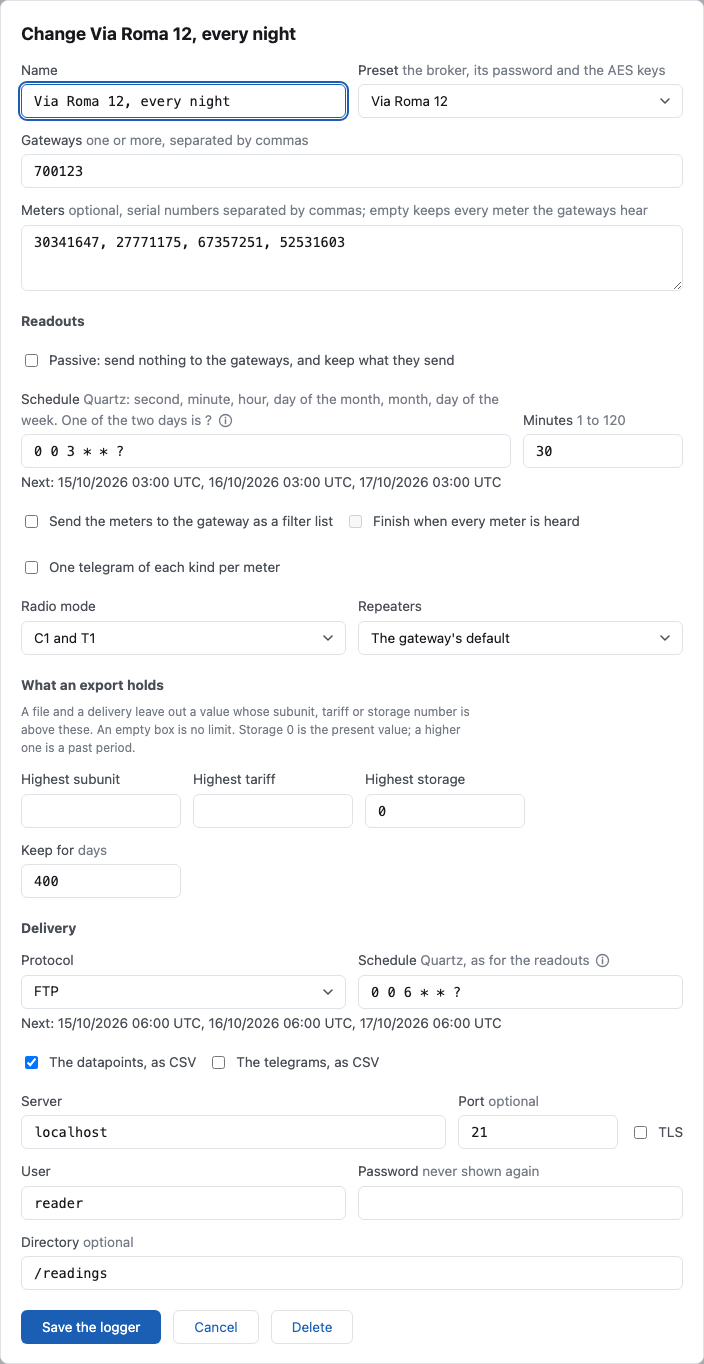
Change opens the same window, with what the logger has in each field. Save the logger keeps what you changed.
An administrator also has Delete there. Every telegram and every datapoint the logger kept is deleted with it, and the bench asks before it does so.
Details
Details shows the gateways, the last 5 readouts and the last 5 deliveries.
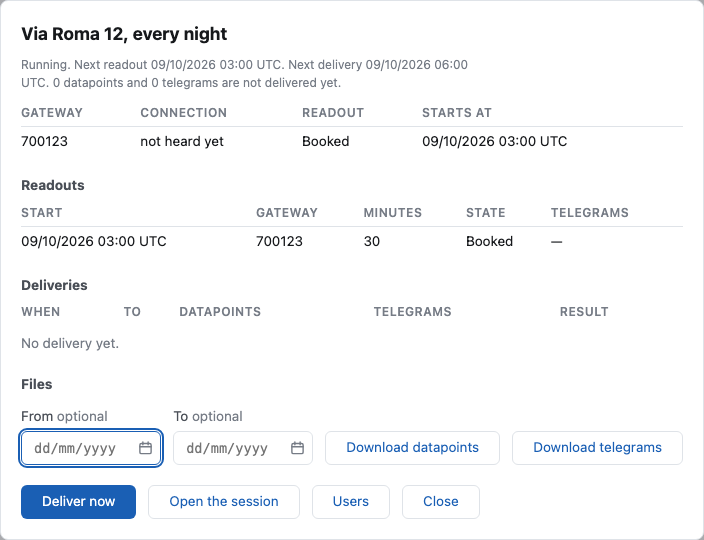
| Readout | |
|---|---|
| Booked | Asked for; the gateway has not started it yet. |
| Running | The gateway reports that it runs. |
| Finished | The gateway reports the end, and how many telegrams it sent. |
| Not started | The gateway did not report a start within five minutes of the time. It did not connect before the time, or it refused. |
| Not known | The bench was not running at the time, or the gateway never reported the end. |
Download datapoints and Download telegrams give the files of the period between the two dates. The dates are days in UTC, and both are in the period. With no dates the file holds everything the logger keeps. A period with too many rows is refused; choose a shorter one.
The datapoints file is CSV with these columns: read_at, gateway,
identity, manufacturer, version, medium, quantity, function,
storage, tariff, subunit, value, unit, measured_at. The telegrams
file is the Frames file of a session, which the M-Bus Explorer reads.
Deliveries
A delivery holds what no delivery has held yet. When one fails, nothing is lost: the next one holds the same rows. Deliver now sends without waiting for the schedule.
- Email: one to five addresses. The files are attached.
- FTP: a server on a public address, a user, a password and an optional directory. Tick TLS for FTP over TLS. The password is kept by the bench and never shown again.
- SFTP: the same fields, with no TLS, because SFTP is always encrypted. Only a password signs in. The bench remembers the key of the server at the first delivery, and the window shows it as Key of the server. Compare it with the key the owner of the server gives you. When the server later shows another key, the delivery fails and nothing is sent. If the server was replaced, tick Forget this key and save: the next delivery takes the new key.
When there is nothing new, nothing is sent, and the list says Nothing new. A large amount goes as several deliveries, one after the other.
The session of a logger
A running logger holds a session. Every administrator finds it in the Sessions list, marked with the logger's name, and opens it like any session: the gateway cards, the meters, the log. Open the session in Details does the same.
This session has no Disconnect. It ends when the logger is stopped.
How a schedule is written
A logger has two schedules: one for the readouts and one for the deliveries. Both are written in the same way, as a Quartz cron: one line of six fields, with a space between them. Each field names the values of one part of a time. The schedule names every time that agrees with all the fields.
0 0 3 * * ?
| | | | | +-- day of the week
| | | | +---- month
| | | +------ day of the month
| | +-------- hour
| +---------- minute
+------------ second
This one is every day at 03:00:00.
Every time is in UTC. Central European time is 1 hour ahead of UTC in
winter and 2 hours ahead in summer. So 0 0 3 * * ? is 04:00 in Italy in
winter and 05:00 in summer.
The page shows the next three times under the box while you type. Read them before you save: they are the fastest way to see what a schedule means.
The fields
| Field | Values | Signs it takes | |
|---|---|---|---|
| 1 | Second | 0 to 59 | * , - / |
| 2 | Minute | 0 to 59 | * , - / |
| 3 | Hour | 0 to 23 | * , - / |
| 4 | Day of the month | 1 to 31 | * , - / ? L W |
| 5 | Month | 1 to 12, or a name | * , - / |
| 6 | Day of the week | 1 to 7, or a name | * , - / ? L # |
| 7 | Year | the year itself, as 2027 | * , - / |
The year is optional. Most schedules have six fields and no year.
The names of the months are JAN, FEB, MAR, APR, MAY, JUN, JUL,
AUG, SEP, OCT, NOV and DEC.
A day of the week is counted from Sunday, and Sunday is 1.
| 1 | 2 | 3 | 4 | 5 | 6 | 7 |
|---|---|---|---|---|---|---|
SUN |
MON |
TUE |
WED |
THU |
FRI |
SAT |
A name is safer than a number, because other cron dialects count the days in
another way. Names and the letters L and W are read in capital or small
letters.
The signs of every field
| Sign | Meaning | Example |
|---|---|---|
* |
Every value. | * as the month: every month. |
, |
A list. | 6,18 as the hour: 06 and 18. |
- |
A range. Both ends are in it. | MON-FRI: Monday to Friday. |
/ |
Steps: a start, then every so many values. | 5/15 as the minute: 5, 20, 35 and 50. |
A list holds ranges and steps too: 0 0 6,12-14 * * ? is 06:00, 12:00, 13:00
and 14:00.
A range may pass the end of the field. As the hour, 22-2 is 22, 23, 0, 1
and 2. FRI-MON is Friday, Saturday, Sunday and Monday. NOV-FEB is November
to February.
Steps. The number before / is the start, and the number after it is the
step.
0/15as the minute is 0, 15, 30 and 45.*/15and/15mean the same.8-18/2as the hour is every second hour from 08 to 18: 8, 10, 12, 14, 16 and 18.- The count starts again in each hour, day, month or year. So
0/5as the hour is 0, 5, 10, 15 and 20, and then 0 again: the last gap is 4 hours, not 1/10as the day of the month is the 1st, the 11th, the 21st and the 31st, and then the 1st of the next month.
The two day fields and ?
A schedule has two fields that name a day: the day of the month and the day
of the week. You write one of them, and ? in the other. ? means: this
field names no day.
0 0 3 15 * ?names a day of the month: the 15th.0 0 3 ? * MONnames a day of the week: every Monday.0 0 3 * * ?and0 0 3 ? * *mean the same: every day.
A schedule with ? in both fields is refused. A schedule with ? in none is
refused too, also when both are *. This is the mistake that people make most
often.
Signs of the day of the month: L and W
| Sign | Meaning |
|---|---|
L |
The last day of the month: the 31st, the 30th, or the 28th or 29th of February. |
L-3 |
Three days before the last day: the 28th in a month of 31 days. |
15W |
The working day nearest the 15th. A working day is Monday to Friday. |
LW |
The last working day of the month. |
W never leaves the month. When the 15th is a Saturday, 15W is Friday
the 14th. When it is a Sunday, 15W is Monday the 16th. But when the 1st is a
Saturday, 1W is Monday the 3rd, and not the Friday before, which is in the
month before.
W knows nothing of public holidays. A holiday from Monday to Friday is a
working day for it.
L may be in a list: 0 0 3 15,L * ? is the 15th and the last day of each
month.
W may be in a list too: 0 0 3 10W,20W,LW * ? is the working day nearest
the 10th, the one nearest the 20th, and the last working day of each month.
The bench reads each day of the list by itself, so a day that moves to the
Friday before does not take the others with it.
A day that a month does not have is not moved to another day.
0 0 3 31 * ? names only the seven months that have 31 days. 0 0 3 29 2 ?
names only the leap years. For the end of each month, write L.
Signs of the day of the week: # and L
| Sign | Meaning |
|---|---|
FRI#1 |
The first Friday of the month. 6#1 is the same. |
MON#3 |
The third Monday of the month. |
FRI#5 |
The fifth Friday. A month with four Fridays has no time. |
FRIL |
The last Friday of the month. 6L is the same. |
L |
With no day before it: Saturday, the last day of the week. |
A schedule holds one # only. MON#1,FRI#1 is refused.
W and # go with one day, never with a range
The bench does not refuse 0 0 3 ? * MON-FRI#1 or 0 0 3 10-15W * ?. It
reads the range and leaves the sign out: the first is every day from
Monday to Friday, and the second is every day from the 10th to the 15th.
The three times under the box show it.
Examples
Every day:
| Schedule | When |
|---|---|
0 0 3 * * ? |
Every day at 03:00. |
0 30 6 * * ? |
Every day at 06:30. |
0 0 6,18 * * ? |
Every day at 06:00 and at 18:00. |
0 0 0/6 * * ? |
Every six hours: 00:00, 06:00, 12:00 and 18:00. |
0 0 * * * ? |
Every hour, at minute 0. |
0 15,45 * * * ? |
Every hour, at minute 15 and at minute 45. |
0 0 22-2 * * ? |
Every hour from 22:00 to 02:00. |
0 0/15 * * * ? |
Every 15 minutes. For a delivery only: see the limits. |
Days of the week:
| Schedule | When |
|---|---|
0 0 3 ? * MON |
Every Monday at 03:00. |
0 30 6 ? * MON-FRI |
Monday to Friday at 06:30. |
0 0 3 ? * SAT,SUN |
Saturday and Sunday at 03:00. |
0 0 3 ? * MON,WED,FRI |
Monday, Wednesday and Friday at 03:00. |
0 0 8-18/2 ? * MON-FRI |
Monday to Friday, every second hour from 08:00 to 18:00. |
0 0 6 ? * FRI#1 |
The first Friday of each month at 06:00. |
0 0 3 ? * MON#3 |
The third Monday of each month at 03:00. |
0 0 3 ? * FRIL |
The last Friday of each month at 03:00. |
Days of the month:
| Schedule | When |
|---|---|
0 0 3 1 * ? |
The first day of each month at 03:00. |
0 0 3 1,15 * ? |
The 1st and the 15th of each month at 03:00. |
0 0 3 1-7 * ? |
The first seven days of each month at 03:00. |
0 0 3 L * ? |
The last day of each month at 03:00. |
0 0 3 L-3 * ? |
Three days before the last day of each month at 03:00. |
0 0 3 LW * ? |
The last working day of each month at 03:00. |
0 0 3 1W * ? |
The first working day of each month at 03:00. |
0 0 3 15W * ? |
The working day nearest the 15th at 03:00. |
0 0 3 15,L * ? |
The 15th and the last day of each month at 03:00. |
Months and years:
| Schedule | When |
|---|---|
0 0 3 1 1/3 ? |
The first day of each quarter at 03:00: January, April, July and October. |
0 0 3 L 3,6,9,12 ? |
The last day of each quarter at 03:00. |
0 0 3 ? NOV-FEB MON |
Every Monday from November to February at 03:00. |
0 0 3 ? OCT-APR * |
Every day from October to April at 03:00. |
0 0 0 1 1 ? |
Once a year: 1 January at 00:00. |
0 0 3 1 1 ? 2027 |
Once: 1 January 2027 at 03:00. |
0 0 3 ? * TUE 2026-2027 |
Every Tuesday at 03:00, in 2026 and in 2027. |
The limits of this bench
Quartz reads more schedules than the bench takes. The bench adds these rules:
- A schedule is at most 63 characters.
- The readouts must not run into each other. The gap between two readouts
is at least Minutes plus 10 minutes. With 30 minutes, the times of the
schedule are at least 40 minutes apart. So
0 0 * * * ?, every hour, is accepted, and0 0/30 * * * ?, every half hour, is refused. - Two deliveries are at least 10 minutes apart.
0 0/15 * * * ?is accepted for a delivery, and0 0/5 * * * ?is refused. - A schedule names a time from now on.
0 0 3 30 2 ?, 30 February, names no time and is refused. A year in the past, as0 0 3 1 1 ? 2020, is refused too.
The bench checks the gap over the next 50 times of the schedule.
A readout starts at the second you write. A gateway that sleeps at that time starts late, or not at all: see How the readouts run.
Schedules that are refused
| Schedule | Why |
|---|---|
0 0 3 * * * |
No ?. Write 0 0 3 * * ?. |
0 0 3 ? * ? |
? in both day fields. |
0 0 3 1 * MON |
Two days named. Write ? in one of the two. |
0 3 * * ? |
Five fields. The first field is the second: write 0 0 3 * * ?. |
0 0 3 ? * 0 |
A day of the week is 1 to 7. Sunday is 1, or SUN. |
0 0 24 * * ? |
An hour is 0 to 23. Midnight is 0. |
0 0 3 32 * ? |
A day of the month is 1 to 31. |
0 0 3 ? * WED#6 |
A month has at most five Wednesdays. |
0 0 3 ? * MON#1,FRI#1 |
Two # in one schedule. |
0 0 3 * * * * |
This is the cron of a gateway's own schedule. See below. |
This is not the cron of a gateway
A gateway has a schedule of its own, for its connections: see Changing a gateway's schedule. The gateway reads that one, and it is written in another way:
| A logger's schedule | A gateway's schedule | |
|---|---|---|
| Fields | Six, and the year when you want one. | Always seven, with the year. |
? |
In one of the two day fields. | Not used. |
| The two days | One is written. | Both are written, and both must match. |
| Sunday | 1 | 0 |
L, W, # |
Read. | Not read. |
A schedule copied from one box to the other is refused, or it names another day.